Fillet
Status: Implemented
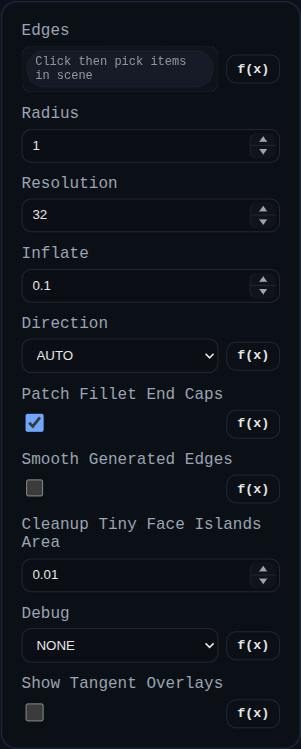
Fillet replaces selected edges on a single solid with a constant-radius blend generated by BREP.filletSolid.
Inputs
edges– pick edges directly or select faces to expand into their boundary edges.radius– constant radius applied to every edge.resolution– number of segments around the fillet tube; increase for smoother large radii.inflate– offsets tangency curves and end caps to avoid coplanar leftovers; closed loops skip the wedge inset to avoid self‑intersection.direction–AUTO(default) classifies each selected edge as inside/outside and applies the corresponding boolean (INSET=> subtract,OUTSET=> union). You can still forceINSETorOUTSET.patchFilletEndCaps– enabled by default; moves eligible three-face tip points and patches selected end-cap triangles.smoothGeneratedEdges– optional endpoint-constrained curve fitting on newly generated fillet boundary edges.cleanupTinyFaceIslandsArea– area threshold for relabeling tiny disconnected face islands (<= 0disables).debug– keeps helper bodies visible and logs extra diagnostics.showTangentOverlays– adds pre-inflate tangency polylines to the helper tube for debugging.
Behaviour
- All selected edges must belong to the same solid; face picks expand to boundary edges before the builder runs.
- Helper tube/wedge bodies are generated per edge, grouped by resolved side, then applied in one unified pass: subtract all
INSETtools and union allOUTSETtools. - In
AUTO, edge side is decided per edge (signed-dihedral first, inside/outside probing as fallback) so mixed inside/outside selections can run in one feature. - Closed-loop paths suppress the wedge inset used for INSET cuts so the cutter does not self-intersect; tangency offsets still keep the fillet slightly inflated to avoid coplanar seams.
- On success the original solid is replaced by the blended result. Enabling
debugleaves helper solids (and optional tangent overlays) in the scene for inspection.