Image Heightmap Solid
Status: Implemented
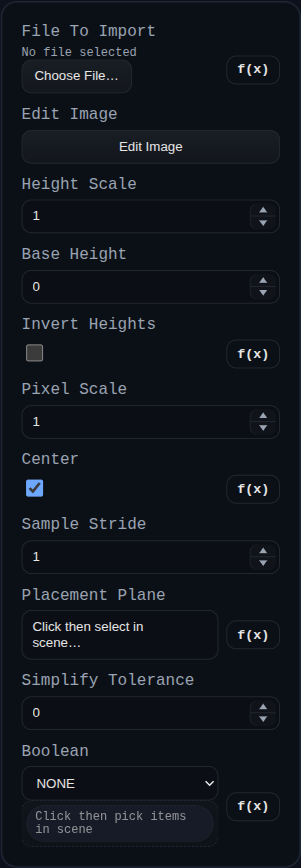
Image Heightmap Solid samples a grayscale (or RGB) image and extrudes the pixels into a heightfield solid, with optional simplification and booleans.
Inputs
fileToImport– PNG heightmap data (file, data URL, or buffer). If empty, the image editor starts with a blank canvas.editImage– Opens the built-in paint-style editor to tweak the heightmap.heightScale– World units of elevation for a full-intensity pixel (0–255).baseHeight– Baseline Z height added to every pixel.invertHeights– Flip grayscale so dark pixels become tall regions.pixelScale– World units per pixel in X/Y.center– Center the heightmap about the origin before placement.sampleStride– Sample every Nth pixel to reduce triangle count.placementPlane– Optional face or plane that defines the placement plane and normal.simplifyTolerance– Tolerance for Manifold simplify (0 disables).boolean.operation/boolean.targets– Optional boolean with existing solids.
Shared Image Editor
This feature uses the shared editor documented at Image Editor (Shared).
Relevant editor functions for Heightmap:
- Paint/erase/fill the source image used for height sampling.
- Adjust canvas size when you need more or less sampled area.
- Use zoom/pan + undo/redo for precise grayscale sculpting before rebuild.
How to use:
- Click
Edit Image. - Paint grayscale content (white/high, black/low unless
invertHeightsis enabled). - Click
Finishto save the edited PNG back intofileToImport.
Behaviour
- Decodes the image to a grid, samples with the requested stride, and builds top/bottom meshes offset by
baseHeightplus scaled pixel heights (with optional invert). - Positions the mesh on the selected plane (or world XY) and centers it if requested.
- Applies optional simplification, runs the configured boolean, and returns the new solid while flagging consumed inputs for removal.